How to Track Local Rankings by Location (Grid Tracking Explained)
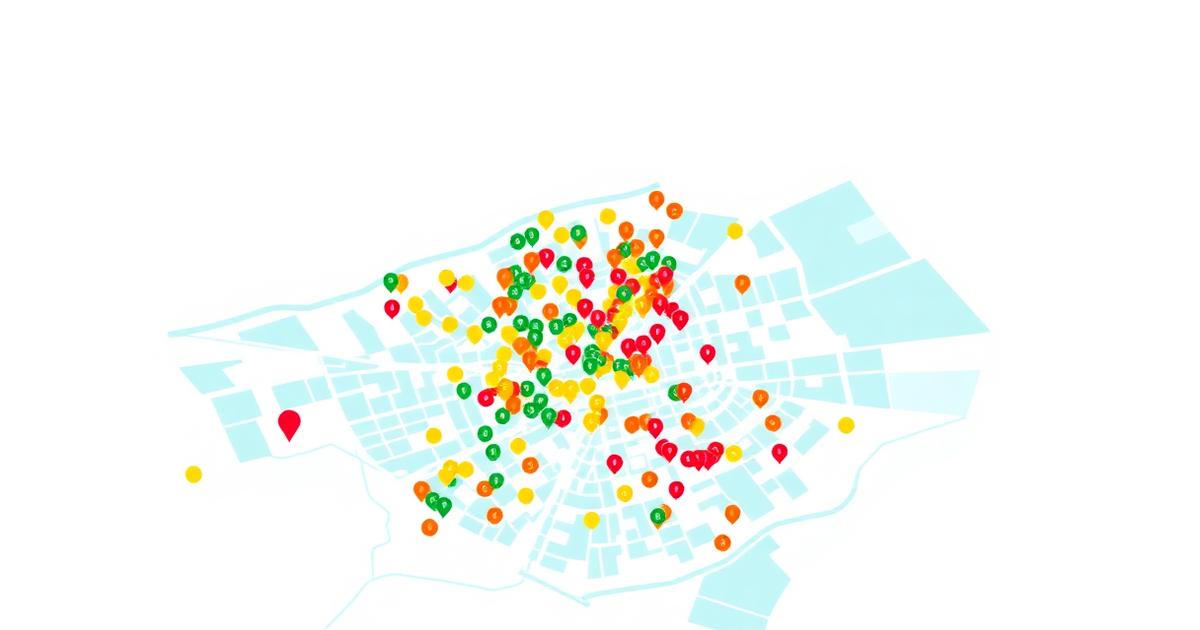
For any business with a physical storefront or a defined service area, standard rank tracking is no longer sufficient. If you are monitoring your rankings from a single fixed point—such as a specific zip code or city center—you are seeing less than 1% of the total picture. In 2026, local search results are hyper-fragmented. A plumber might rank #1 for "leak repair" when a user searches from a block away, but drop to #8 when the user moves just three streets over. This phenomenon is driven by proximity, a core pillar of Google’s local algorithm that creates a "neighborhood effect" in search results.
To understand how your business truly performs, you must learn how to track local rankings by location using coordinate-based grid tracking. Unlike traditional tracking, which provides a linear list of ranks, geo-grid tracking provides a spatial visualization of your visibility. This allows you to identify "blind spots" in your local reach and adjust your optimization strategy based on where your competitors are gaining ground. By mapping your rankings across a multi-point grid, you can see exactly where your Google Business Profile (GBP) authority ends and where a competitor’s territory begins.
This guide explores the mechanics of geo-grid tracking, the specific variables that influence local visibility, and how to configure your tracking environment to yield actionable data. We will distinguish between the Local Pack (the "Map Pack") and local organic results, and provide a step-by-step workflow for expanding your digital footprint through data-driven local SEO.
- Local rankings are hyper-sensitive to the user's precise longitude and latitude, often changing within a few hundred meters.
- Geo-grid tracking uses a matrix of coordinates to simulate searches from multiple points, creating a visual heat map of visibility.
- Proximity remains the strongest ranking factor, but it can be countered by high relevance and strong prominence (reviews, citations, and backlinks).
- Setting the correct grid density and radius is critical; a 13x13 grid at a 5-mile radius provides vastly different insights than a 3x3 grid at a 1-mile radius.
- Effective local tracking must account for both the Google Map Pack and the localized organic results appearing below the maps.
The Anatomy of a Local Search Result
Google’s local search algorithm operates differently than its primary web index. While web search focuses heavily on E-E-A-T (Experience, Expertise, Authoritativeness, and Trustworthiness), local search relies on a triad of factors: proximity, relevance, and prominence. Understanding these is essential before you begin tracking, as they explain why your rankings fluctuate as you move across a map.
Proximity: The Unavoidable Factor
Proximity is the distance between the searcher and the business. In the early days of local SEO, "city center" was the primary anchor point. Today, Google uses the user's precise GPS coordinates or IP-derived location. This creates a "proximity filter" where Google prioritizes the closest relevant business to minimize friction for the user. When you learn how to track local rankings by location, you quickly realize that your "average rank" is a vanity metric; what matters is your "rank at the point of intent."
Relevance: Matching the Query
Relevance is how well a local business profile matches what someone is searching for. This is heavily influenced by your Google Business Profile categories, your website’s localized content, and the specific services you list. If a user searches for "emergency 24-hour locksmith" and you only list "locksmith" without specifying emergency hours, a competitor further away might outrank you because they are more relevant to the specific intent. Effective keyword research for local intent requires identifying these specific service modifiers.
Prominence: The Competitive Edge
Prominence refers to how well-known a business is in the offline and online world. This is where you can beat proximity. A famous restaurant with 2,000 five-star reviews and hundreds of local backlinks might rank #1 across an entire city, even if there are closer options. Prominence is built through consistent citations, a robust review acquisition strategy, and local link building. Tracking your prominence requires comparing your grid coverage against competitors to see if their "bubbles" of visibility are larger than yours.
What is Geo-Grid Rank Tracking?
Traditional rank tracking tells you that you are #3 for "dentist in Chicago." However, Chicago covers 234 square miles. Being #3 at the Willis Tower doesn't mean you are #3 in Lincoln Park. Geo-grid tracking (or geo-spatial tracking) solves this by placing a virtual grid over a map. Each point on the grid represents a search performed from those exact coordinates.
A typical grid might be 5x5 (25 total points) or 13x13 (169 total points). At each point, the local rank tracker records your position in the Local Pack. The results are then color-coded: green for top-3 positions, yellow for positions 4-10, and red for anything lower. This creates a heat map. If your heat map is green in the center (where your office is) but turns red two miles to the north, you have identified a specific geographic area where you lack prominence or relevance.
| Tracking Method | Data Point Source | Granularity | Best For |
|---|---|---|---|
| Zip Code Tracking | Centroid of Zip Code | Low | National brands with one location per city. |
| City-Level Tracking | City Center (Centroid) | Low | General brand awareness monitoring. |
| Geo-Grid Tracking | GPS Coordinates (Lat/Long) | Very High | Local businesses competing in dense urban/suburban areas. |
| GSC Data | Aggregated User Data | Medium | Understanding total impressions vs. specific locations. |
Why Local Results Vary Block by Block
The variance in local results is often frustrating for business owners. You might stand in your lobby, search for your service, and see yourself at #1. Your spouse might search from the grocery store two miles away and not see you at all. This "neighborhood algorithm" is designed to provide the most convenient results.
Factors that cause block-by-block variance include:
- Competitor Density: In a dense downtown area, a move of 500 feet might put you closer to three other competitors, pushing you out of the top 3.
- Physical Barriers: Google’s algorithm sometimes accounts for geography. A business across a river or a highway might be "closer" as the crow flies but "further" in terms of driving time, impacting its rank.
- Search Intent Changes: In some areas, Google may interpret a search as having higher local intent (e.g., searching for "coffee" in a commercial district vs. a residential one).
Understanding these nuances is a key part of rank tracking explained in a local context. Without a grid, you are essentially flying blind, unaware that you are losing thousands of potential customers just outside your immediate vicinity.

Configuring Your Local Grid: Radius and Density
One of the most common mistakes in learning how to track local rankings by location is choosing the wrong grid parameters. If your grid is too small, you won't see the edge of your reach. If it's too large, your data will be diluted by areas you could never realistically serve.
Choosing the Right Radius
The radius is the distance from your business to the outer edge of the grid. For a coffee shop in Manhattan, a 1-mile radius is likely sufficient because customers won't travel further for a latte. For a specialized roofing contractor in a rural area, a 20-mile radius might be necessary. You should base your radius on your actual customer data. Where do your current clients come from? Set your tracking to match that footprint.
Determining Grid Density
Grid density refers to how many points are within that radius. A 3x3 grid provides 9 data points—useful for a quick pulse check but lacking detail. A 9x9 or 13x13 grid provides the granular detail needed to see exactly which street corners you are losing. Generally, higher density is better for urban environments where competition is fierce, while lower density suffices for rural areas.
Setting the Cadence
How often should you track? Local rankings are generally more stable than global organic rankings, but they can be disrupted by Google Business Profile updates or new competitor reviews. Weekly tracking is the standard for most local businesses. However, if you are actively running a local SEO campaign, daily tracking helps you see the immediate impact of new reviews or citation cleanups. You can compare these metrics against your Search Console data to bridge the gap between "rankings" and "actual clicks."
Local Pack vs. Local Organic Tracking
It is vital to distinguish between the "Local Pack" (the map results) and "Local Organic" (the blue links below the map). They are governed by different algorithms, though they influence one another.
The Local Pack is driven by your Google Business Profile. Factors like your primary category, the presence of your phone number, your proximity to the user, and your review score are paramount here. When you use a local rank tracker, this is usually the primary focus of the heat map.
Local Organic rankings are driven by your website’s SEO. This is where traditional factors like content, site structure, and backlinks come into play. Even if you don't have a physical office in a specific suburb, you can rank in the local organic results by creating high-quality service-area pages. If you are struggling with these results, you may need to consult a technical SEO checklist to ensure your site is crawlable and localized correctly.
"Local SEO is no longer about being 'near' a city; it is about being the most relevant answer for a specific coordinate. If your data doesn't reflect the geographic diversity of your service area, your strategy is based on an incomplete map."
How to Read and Interpret a Local Heat Map
Once your grid tracker generates a report, you will see a map covered in colored circles with numbers. The numbers represent your rank at that specific point. Interpreting this visualization is an art.
- The "Green Core": Most businesses rank well immediately around their office. If you aren't #1 or #2 at your own address, there is a major issue with your profile—likely a suspension, a category error, or a lack of basic citations.
- The "Directional Fade": If you rank well to the North and East but disappear to the South and West, look for competitors in those directions. They likely have higher prominence or better proximity to those specific neighborhoods.
- The "Swiss Cheese" Pattern: If your rankings are spotty (green, then red, then green), it often indicates inconsistent NAP (Name, Address, Phone) data across the web or that Google is testing different results in those areas. It can also suggest that your search intent optimization is inconsistent across your service pages.
- The "Competitor Wall": If your rankings drop off sharply at a specific boundary, you have likely hit the "territory" of a dominant competitor. To break through this wall, you need to increase your prominence through localized PR and review volume.
| Business Type | Recommended Radius | Grid Density | Key Metric to Watch |
|---|---|---|---|
| Retail / Coffee / Gym | 1 - 3 Miles | 7x7 or 9x9 | Rank within 5-minute walk/drive. |
| Professional Services (Law, CPA) | 5 - 10 Miles | 5x5 or 7x7 | Rank in high-income neighborhoods. |
| Home Services (Plumber, HVAC) | 15 - 30 Miles | 11x11 or 13x13 | Coverage across entire service area. |
| Medical / Dental | 3 - 5 Miles | 7x7 | Rank relative to local hospitals. |
Step-by-Step Setup for Location-Level Tracking
Setting up your tracking environment correctly ensures you don't waste your budget on useless data. Follow this workflow to get started with RankThrottle or a similar tool.
1. Identify Your Core Keywords
Don't track every keyword. Focus on high-intent "money" keywords. If you are a lawyer, track "personal injury lawyer" and "car accident attorney," not "lawyer news." Use keyword research for beginners techniques to find terms that actually trigger a Local Pack in the SERPs.
2. Connect Your Google Business Profile
Most advanced trackers allow you to sync your GBP. This is crucial because it allows the tool to track your specific "Place ID." This ensures that even if your business name is similar to others, the tracker is looking at your specific entity.
3. Define Your Service Area Grid
Based on the table above, select your radius and density. If you are unsure, start with a 5-mile radius and a 7x7 grid. This gives you 49 points of data, which is enough to see a clear pattern without being overwhelmed.
4. Identify Key Competitors
A good local rank tracker doesn't just track you; it tracks the businesses currently holding the top spots at each grid point. Identify your top 3-5 competitors and track them alongside your profile. This allows you to see if a drop in your ranking is due to a Google update or a specific competitor’s aggressive SEO push.
5. Establish a Baseline
Before you make any changes to your website or GBP, run a baseline report. This is your "before" picture. As you implement changes—such as adding new photos to your GBP or getting listed in a local directory—you can track the expansion of your "green zone" on the map.
Common Measurement Mistakes to Avoid
Even with the best tools, human error can lead to poor decision-making. Avoid these common pitfalls when tracking local rankings by location.
Ignoring Organic Rankings: Only tracking the Map Pack is a mistake. Many users skip the maps and go straight to the organic results. You need to know if you are visible in both. If you are ranking in the Map Pack but not organic, your website likely needs work. If you are ranking in organic but not the Map Pack, your GBP needs optimization.
Tracking During Off-Hours: Some local results change based on whether a business is currently "Open." If you track a restaurant at 2:00 AM when it's closed, it might rank lower than a 24-hour diner. Ensure your tracking is scheduled during peak business hours for the most accurate representation of consumer experience.
Over-Optimizing for the Centroid: The "centroid" is the geometric center of a city. Many businesses obsess over ranking in the center of town, even if their target customers are in the suburbs. Focus your tracking—and your SEO efforts—where the money is, not just where the "city" technically begins.
Failing to Account for Brand Dilution: If you have multiple locations, ensure your tracking doesn't overlap to the point of confusion. Each location should have its own grid, and you should monitor for "cannibalization" where one of your locations is outranking another for the same area, potentially wasting your internal resources.
Acting on the Data: How to Expand Your Reach
Data is only useful if it leads to action. Once you have your geo-grid heat map, use it to guide your local SEO strategy.
Targeting the "Yellow Zones"
The yellow zones (ranks 4-10) are your biggest opportunities. You are already on Google’s radar for these locations, but you aren't yet in the "conversion zone" (the top 3). To move from yellow to green, focus on increasing your local relevance for those specific areas. Mentioning neighborhood names on your website, geotagging images from those areas, and acquiring reviews from customers in those zip codes can provide the necessary boost.
Countering Competitor Dominance
If a competitor owns a specific part of the map, analyze their profile. Do they have more reviews? Are their reviews more recent? Do they have a more specific primary category? Often, a competitor’s dominance is due to "Review Velocity"—the speed at which they acquire new reviews. If you see them winning, it’s time to ramp up your review solicitation process.
Optimizing for "Service-Area" Visibility
If you are a service-area business (SAB) without a physical office that customers visit, your grid tracking is even more important. Since you don't have a "storefront" to draw people in, your digital presence is everything. Ensure your "Service Areas" in the GBP dashboard match the areas where you want to rank, and create dedicated landing pages for the major towns or neighborhoods within your grid. If your pages aren't showing up, you may need to fix indexing issues to ensure Google sees your localized content.
The Role of Citations and Backlinks in Local Grids
While proximity is a fixed variable, prominence is a lever you can pull. Prominence is built through two primary channels: citations and local backlinks.
Citations: These are mentions of your business name, address, and phone number (NAP) on other websites like Yelp, Yellow Pages, and industry-specific directories. Consistency is key. If your address is "123 Main St" on one site and "123 Main Street" on another, it can slightly dilute your local authority. Use your grid data to identify which areas you are weak in, and then look for local directories specific to those neighborhoods or suburbs.
Local Backlinks: A link from a local high school, a neighborhood blog, or a local news outlet carries significant weight in local SEO. These links signal to Google that your business is an integral part of the local community. If your grid shows a lack of visibility in a specific part of town, consider sponsoring a local event or getting featured in a local publication in that specific area.
For those looking to scale this process across multiple locations, understanding the difference between white-label vs. full-service SEO agencies can help you decide whether to manage this in-house or outsource the heavy lifting of link building and citation management.
The Future of Local Tracking: AI and Personalization
As we move through 2026, local search is becoming even more personalized. Google’s AI Overviews now incorporate local data, providing summarized answers to queries like "which plumber near me is best for old copper pipes?" This adds a new layer to rank tracking. It’s no longer just about being in the top 3; it’s about being the business the AI selects to highlight.
Tracking this requires tools that can interpret generative AI results. To stay ahead, you must optimize your profile and website for AI search optimization. This involves providing clear, structured data and long-form content that answers specific, niche questions that local customers are asking.
Summary: Mastering the Map
Mastering how to track local rankings by location is a requirement for modern local business success. By moving away from static, single-point tracking and embracing the geo-grid, you gain a competitive advantage that most of your competitors are likely ignoring. You can see the boundaries of your influence, the encroachment of your competitors, and the direct impact of your SEO efforts.
Remember that local SEO is a marathon, not a sprint. Changes in your grid visibility often take weeks or months to manifest after you’ve implemented optimizations. If you are wondering how long SEO takes to work, the answer in a local context is often "faster than national," but only if your data is accurate. Use geo-grid tracking to ensure you are focusing your energy on the areas that will actually drive phone calls, store visits, and revenue.
Frequently asked questions
Is geo-grid tracking against Google's Terms of Service?
No, geo-grid tracking is not against Google’s terms. These tools essentially automate the process of checking a public search result from a specific location. However, doing this at a massive scale without proper tools can lead to IP blocks, which is why professional rank trackers use distributed proxy networks to gather data safely and accurately.
How many points should my grid have?
For most small to medium businesses, a 7x7 or 9x9 grid is the "sweet spot." This provides 49 to 81 data points, which is enough to identify geographic trends without generating so much data that it becomes difficult to analyze. If you are in a extremely competitive market like New York City or London, a 13x13 grid may be necessary to see block-by-block changes.
Why does my rank change so much when I move just one mile?
This is usually due to the "Proximity Filter." Google wants to show the most convenient result. If there are three other businesses similar to yours between your new location and your office, Google will likely show them instead. It can also be due to "Competitor Prominence"—a competitor a mile away may have significantly more reviews, causing them to "push" you out of the results once you leave your immediate vicinity.
Can I track my competitors on a geo-grid?
Yes, and you should. Most professional local rank trackers allow you to input competitor names or Place IDs. This allows you to see their heat map overlaid with yours. If you see that a competitor has a massive "green zone" while yours is small, you can investigate their profile to see what they are doing better, such as having more localized content or a higher volume of reviews.
Does a "Service Area" in GBP help me rank in those areas?
Setting a service area in your Google Business Profile tells Google where you are willing to travel, but it is not a "ranking booster." You still need to build prominence and relevance for those areas. Simply checking a box for a specific city won't make you rank there if you don't have the reviews, backlinks, and website content to support your presence in that location.